Local SEO
Local Citations and NAP Consistency: A Plain-English Guide
What local citations are, why your name, address and phone need to match everywhere, where to list your business and how to fix inconsistent listings.

TLDR
- A citation is any listing of your business name, address and phone number (NAP) on another site.
- Matching details everywhere help Google and customers trust that your information is right.
- Fix the listings people actually use first. Don't chase a number.
A citation is any place online that lists your business name, address and phone number. Directories, maps apps, review sites, your chamber of commerce. People in the industry call those three details your NAP.
Citations help in two ways. They give customers more places to find you, and when they all agree, they help Google trust that your information is correct. When they don’t agree, you’ve got a problem.
Why matching details matter
Picture a customer who finds your old phone number on a directory, calls it and gets a disconnected line. That’s a lost job.
Now picture Google seeing three different phone numbers and two business names for what should be one company. It has less reason to be confident about any of them. Consistent details are part of what makes a business look established and trustworthy, which feeds the prominence part of how Google ranks local results.
Where your details spread
Your information doesn’t just live where you put it. It gets copied, shared and resold.
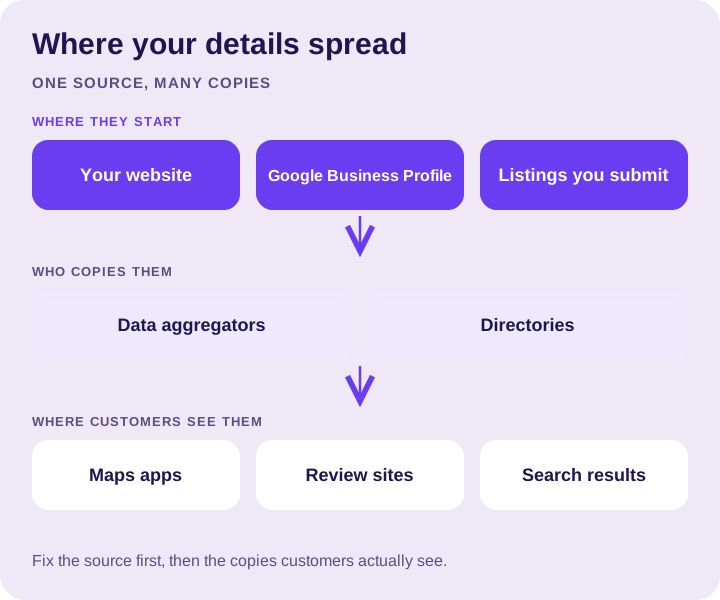
That’s why an old address from five years ago can still pop up somewhere. One outdated source can feed many others.
What counts as consistent
Consistent doesn’t mean identical down to the comma, but it should be the same business, clearly.
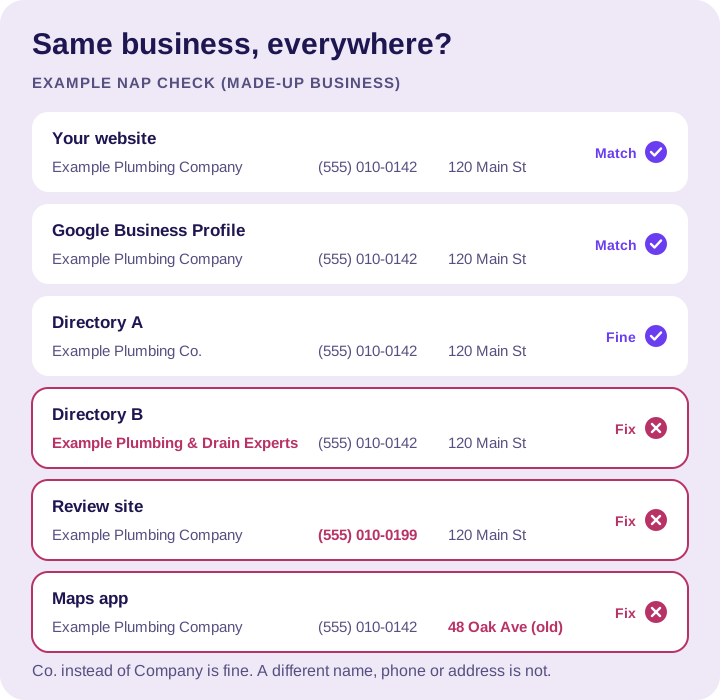
- Name: your real business name, the one on your signs and paperwork. Not one version with “LLC” and another with keywords.
- Address: the same format everywhere. If you’re a service area business and hide your address on Google, keep it consistent with what you show elsewhere.
- Phone: one main number. If you’ve changed numbers, the old one needs to come off every listing you can reach.
- Website: the same link, ideally to your homepage or the right location page.
Where to list your business
Start with the places customers actually use, not a target number of directories:
- Your Google Business Profile. The most important one. Get it right first.
- Bing Places and Apple Business Connect, so you show up correctly in Bing and Apple Maps.
- The big review and directory sites in your trade, like Yelp, the Better Business Bureau and Facebook.
- Trade and local organizations: your chamber of commerce, trade associations, manufacturer “find a pro” directories if you’re certified.
After that, more listings have diminishing returns. Quality and accuracy matter far more than count.
How to fix inconsistent listings
- Write down your correct NAP exactly as you want it. That’s your master copy.
- Search for your business name and your old phone numbers. Note every listing that’s wrong.
- Claim and correct the listings you can. Most major directories let you claim a listing for free.
- Request removal of duplicates, like a second listing created years ago.
- Keep a simple record of where you’re listed and who has the login. Next time something changes, you’ll know where to update it.
What to avoid
- Fake or virtual addresses to look local in more places. Google doesn’t allow a virtual office that isn’t staffed, and it can get your profile suspended.
- Paying for hundreds of junk directories nobody visits.
- Creating new listings instead of claiming and fixing the old ones, which just makes more duplicates.
The bottom line
Pick one correct version of your business details, make your profile and website match it, then fix the listings people actually see. That’s most of the work.
Cleaning up listings is part of our local SEO service. For the rest of the map, see our Google Maps ranking checklist.
Want a hand with your profile?
Tell us about your business and the towns you serve. We can help you decide what to work on next.