
Business tools · DIY guide
Are You Paying for Google Workspace Seats Nobody Uses?
We went to upgrade a client's Google Workspace and found 4 empty seats, an annual lock-in and a renewal set to repeat it. Here's how to check yours.
 Noah Ziegler10 min read
TLDR
- We went to upgrade a client's Google Workspace and found 9 licenses on the bill and 5 in use. That's $56 a month for nobody.
- On an annual plan you can't drop licenses until renewal. Google said no three times: in chat, by email, and from its internal team the next morning.
- One setting fixes next year: "Auto-renew my contract with fewer licenses." Check yours before your renewal date.
Update, November 11: Google’s answer is no. Three times. The support chat said no. A human took it to an internal team, even after we offered to commit to the upgrade for the year. Then two emails said no again. Details below.
We went in to upgrade one Google Workspace feature for a client.
We came out wanting to audit every subscription we manage.
Here’s what happened, what it cost, and the one setting you should check today.
What the client wanted
Simple request. Every Google Meet across the company should start a transcript on its own, with Gemini taking notes.
We turned on Gemini notes for all hosted meetings with the setting they already had.
Transcripts were the catch. Business Standard already includes meeting transcription. But the admin setting that makes transcripts start automatically for the whole organization is listed for Business Plus and up.
So we went to price the upgrade.
What we found in billing
Nine licenses on the bill. Five people using them.
| Business Standard (current) | Business Plus (upgrade quote) | |
|---|---|---|
| Licenses committed | 9 | 9 |
| Licenses assigned | 5 | 5 |
| Licenses unused | 4 | 4 |
| Price per license, per month | $14 | $22 |
| Total per month | $126 | $198 |
| The 4 unused licenses, per month | $56 | $88 |
| The 4 unused licenses, per year | $672 | $1,056 |
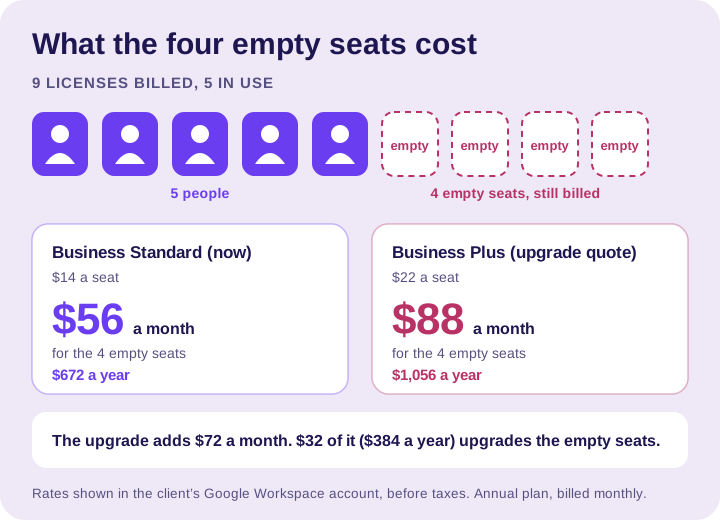
The upgrade would have raised the bill by $72 a month.
$32 of that, or $384 a year, would have gone to upgrading four seats nobody sits in.
To be precise: $1,056 is what those four empty seats would cost in a year at the Business Plus rate. That’s $264 a year for each seat nobody sits in. It’s not the extra cost of the upgrade.
We didn’t buy it.
Why four seats were empty
This isn’t a story about layoffs or a business shrinking. The client said we could share it.
Two extra licenses came from email addresses for client communications and advertising that got set up wrong along the way. They were never two extra employees.
The other two belonged to the owner’s kids. They left for college, and their work got automated with AI.
The business changed. The bill didn’t.
The annual commitment catch
The plan is an annual commitment, billed monthly. This one runs until May 29, 2027.
Google spells out the rule in its plan comparison: on an annual plan, you can remove licenses only at renewal. Until then, you pay for every license you bought.
The billing controls in the account matched that. We couldn’t drop from nine to five. Switching to the Flexible Plan would only take effect at renewal.
Flexible costs more per person. Google lists Business Standard at $16.80 a user per month on Flexible, against $14 on the annual plan.
But a higher rate doesn’t mean a bigger bill when you’re paying for fewer people. Five users on Flexible would be $84 a month. Nine on the annual plan is $126.
So we asked Google’s Workspace support chat. It’s an AI assistant, and it warns that it “may provide inaccurate results.” Its answer lined up with the help pages anyway:
“Because this is a binding contract, we cannot make manual exceptions to reduce your committed seat count mid-term.”
It also confirmed the upgrade would drag the nine seats along: “your existing contract commitments carry over to your new plan.”
Then it offered three options. The first one is my favorite:
“Utilize the extra seats: Since you are already paying for 9 seats, you can assign the remaining 4 licenses to new users at no additional cost.”
No additional cost. For seats we’re already paying for.
The other two: upgrade now and pay the new rate on all nine, or set the plan to renew with fewer licenses. We took the third.
Three nos
Then we kept pushing.
The chat said no. We got a human. We waited. We answered more questions. She said she’d take it to an internal team, even after we offered to commit to the Business Plus upgrade for the year.
No number two came by email that day, from Google Workspace Billing Support:
“Our system does not support mid-term reductions to the total license commitment count, meaning upgrades and billing calculations apply to the full active commitment of 9 seats.”
With a silver lining:
“Your 5 active licenses remain fully operational and ready for your team.”
No number three landed the next morning, from the internal team:
“As you are currently enrolled in an annual subscription, modifications such as license reductions or plan downgrades are restricted until your upcoming renewal date on May 30, 2027.”
Their suggestion? Update the renewal settings. We’d already done that, the day before.
My take: “We’ll take it to the internal team” is easier to say on a call than “no.” The no shows up in your inbox the next morning.
Buffoonery.
All told: 30 minutes to an hour of a business morning, a support chat, a human and two emails, to hear the same no the chat gave us first.
The renewal setting that would have done it again
Here’s the part that got me.
When we opened the renewal options, the account was set to “Auto-renew my contract.” Read the fine print.

Another 12 months. Nine licenses. Five people.
There’s a second option: “Auto-renew my contract with fewer licenses.” On the renewal date, Google renews for the number of user accounts you have that day and drops the licenses you’re not using.
We switched it and checked that it saved. If five accounts are left at renewal, it should renew for five.
That setting doesn’t lower this year’s bill on its own. It stops next year from repeating it.
I can’t tell you why the account was set this way, or whether every account starts there. I can tell you a busy owner could miss that setting for years.
Absolute clownery.
How I think about it
Think about my landscaper.
In summer I need mowing, weed pulling and mosquito treatment. In winter I need less. My bill follows the work.
Spreading the real seasonal cost into equal monthly payments is one thing. Charging me the full summer package in January for work I don’t need is what I’m questioning.
To be fair, Workspace is sold as an annual commitment, and the client agreed to one. I’m questioning the model and how easy it is to renew the wrong number. Not the contract.
A different way to bill
Compare that to KIE.ai, the AI platform we use to make images and video. Its pricing page says it plainly: “there is no subscription and credits never expire.”
You prepay. You use what you need. What you don’t use waits for you.
It’s an AI platform, not a Workspace replacement. Different tools, different jobs. But a very different idea of whose money it is.
Check your own Workspace
Give it ten minutes. You’ll need billing access in the Admin console.
- Count your seats. In the Admin console, go to Billing, then Subscriptions. Compare the licenses you’re paying for with the licenses assigned to real people.
- Know your plan and your date. Annual or Flexible? When does it renew?
- Check your renewal setting. Next to Renewal options, click Change. If your team changed, pick “Auto-renew my contract with fewer licenses” and save.
- Clean up before renewal. Delete accounts you don’t need, or unassign their Workspace license. The fewer-licenses setting counts accounts on renewal day. Google’s guide to reducing licenses walks through it.
- Count before you upgrade. Our upgrade quote covered all nine licenses, empty ones included.
- Count before you commit. Once you’re in, Google’s billing team says its system “does not support mid-term reductions.” Check seats before you sign or renew an annual plan.
FAQs
Can I remove Google Workspace licenses in the middle of an annual plan?
No. On an annual plan, Google says you can remove licenses only at renewal, and you pay for every license you bought until then. Google’s billing support told us its system “does not support mid-term reductions.”
What does “Auto-renew my contract with fewer licenses” do?
It renews your plan for the number of user accounts you have on your renewal date and drops the licenses you’re not using. It doesn’t lower this year’s bill. It stops next year from repeating it.
Will upgrading Google Workspace charge me for unused licenses?
Yes, if you’re on an annual commitment. Google’s support chat told us existing commitments carry over to the new plan. Our upgrade quote covered all nine licenses, the four empty ones included.
Is the Flexible Plan cheaper than the annual plan?
Not per user. Google lists Business Standard at $16.80 a user per month on Flexible, against $14 on the annual plan. But if you’d pay for fewer people, the total can still be lower: five users on Flexible would be $84 a month, against $126 for nine on the annual plan.
How do I check how many Workspace licenses I’m paying for?
Go to Billing, then Subscriptions, in the Admin console. Compare the licenses you’re paying for with the licenses assigned to real people. You’ll need billing access to see it.
Do I need Business Plus for automatic Google Meet transcripts?
For the company-wide automatic setting, yes. Business Standard includes meeting transcription, but the admin setting that makes transcripts start automatically for the whole organization is listed for Business Plus and up.
What we’re doing now
We went in to upgrade one service. We came out auditing every subscription we manage.
If a “simple upgrade” can uncover $672 a year in empty seats, it’s worth asking what else is quietly renewing on your card.
Want a second set of eyes on what your business pays for every month? Let’s talk.