
Local SEO · DIY guide
Schema Markup for Local Businesses: What's Worth Adding
Which schema markup helps a local business, which to skip, and why review stars and FAQ rich results are off the table. A plain-English guide for owners.
 Noah Ziegler5 min read
TLDR
- Schema markup labels your business details in code so search engines read them correctly.
- Use the most specific business type, and make every detail match what's on the page.
- Skip review stars for your own reviews and FAQ markup for rich results. Google doesn't show either for that.
Schema markup is a small block of code on your website that labels your details: this is our name, this is our phone number, these are our hours. Visitors never see it. Search engines read it.
It’s one of the easiest technical fixes on a local site, and also one of the most oversold. Here’s what’s worth adding and what to leave out.
What schema can and can’t do
Google’s guide to local business structured data says the markup can tell Google about things like your business hours and departments, and can help your details show in a knowledge panel.
What it can’t do is guarantee anything. Markup makes you eligible for some features. It doesn’t promise them, and it won’t rank a weak page. Google also says there’s no special markup needed for its AI features.
What’s worth adding
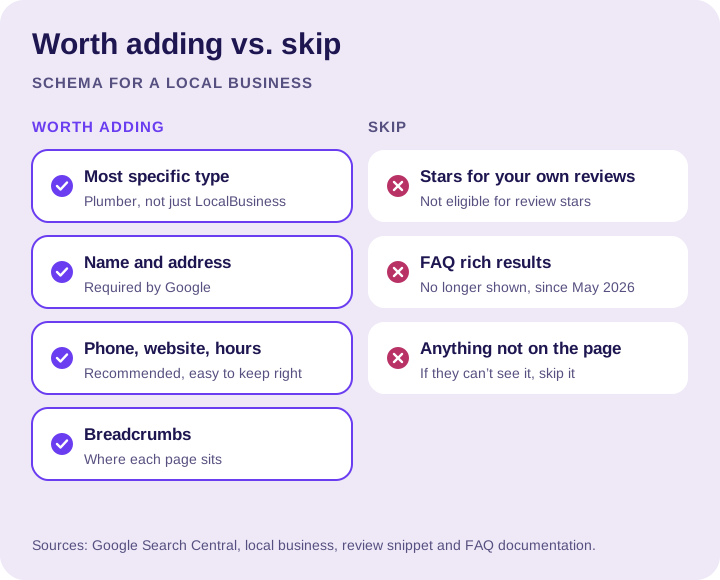
- The most specific business type. Google says to use the most specific LocalBusiness type you can. Schema.org has types like
Plumber,Electrician,HVACBusiness,RoofingContractor,HousePainterandGeneralContractor. - Name and address. Google lists both as required for local business markup.
- Phone, website and hours. Google recommends them, and they’re easy to keep right.
- Breadcrumbs.
BreadcrumbListmarkup shows where a page sits in your site, like Home › Services › Drain cleaning.
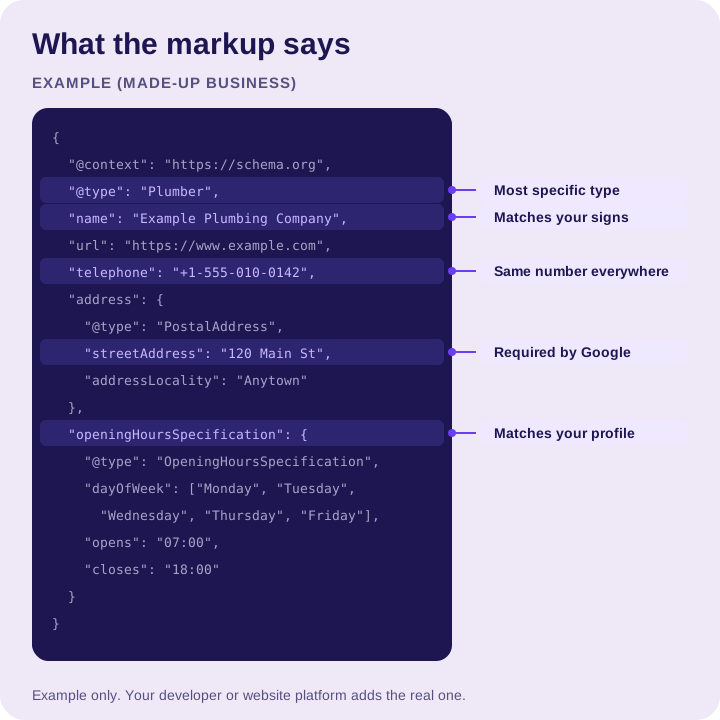
Whatever you add, it has to match what’s on the page and on your Google Business Profile. Different hours in your code and on your profile is the same problem as a mismatched listing.
If you’re a service area business
Google’s local business markup lists an address as required. If you hide your address on your Google profile because you work at customers’ homes, don’t publish it in your code just to fill a field. Keep your markup consistent with what you show customers. Schema.org’s areaServed property is the place to list the areas you cover.
What to skip
- Star ratings for your own reviews. Google’s review snippet guidelines say that when a business controls the reviews about itself, its LocalBusiness and Organization pages aren’t eligible for review stars. Testimonials on your own site won’t earn stars in search.
- FAQ markup for rich results. Google stopped showing FAQ rich results in Search in May 2026. FAQs on your page can still help readers. Just don’t add markup expecting the dropdowns in search.
- Markup for things that aren’t on the page. If a customer can’t see it, don’t mark it up.
What it looks like
Here’s an example for a made-up plumbing company. Your developer or website platform adds this to your pages.
How to check it
- Run your page through Google’s Rich Results Test to catch errors.
- Use the URL Inspection tool in Search Console to see how Google reads the page.
- Re-check after any change to your hours, phone or address. Markup goes stale like any other listing.
FAQs
Does schema markup improve Google rankings?
Not by itself. Markup can make you eligible for some features, but it doesn’t promise them and it won’t rank a weak page. Think of it as clear labels, not a ranking boost.
Which schema type should a local business use?
Use the most specific LocalBusiness type you can, which is what Google recommends. Schema.org has types like Plumber, Electrician, HVACBusiness, RoofingContractor, HousePainter and GeneralContractor.
Can my own reviews show star ratings in Google search?
No. Google’s review snippet guidelines say a business that controls the reviews about itself isn’t eligible for review stars on its LocalBusiness and Organization pages. Testimonials on your own site won’t earn stars in search.
Is FAQ schema still worth adding?
Not for rich results. Google stopped showing FAQ rich results in Search in May 2026. FAQs on your page can still help readers, so keep them for people.
Should a service area business put its address in schema markup?
Not if you hide it on your Google profile. Keep your markup consistent with what you show customers, and use Schema.org’s areaServed property to list the areas you cover.
How do I test my schema markup?
Run the page through Google’s Rich Results Test to catch errors. Then use the URL Inspection tool in Search Console to see how Google reads the page, and re-check after any change to your hours, phone or address.
The bottom line
Label your business accurately with the most specific type, keep every detail matching your page and your profile, and skip the shortcuts that Google doesn’t reward. That’s all most local businesses need.
Not sure what your site has today? Let’s talk, and we’ll take a look.