AI search · DIY guide
10 Free AI Search Resources Your Marketing Agency Hoped You'd Never Find
Google, Bing, OpenAI, Anthropic and Perplexity wrote free guides on how AI search picks sources. Here are 9, what to do with each, and a free call.
 Noah Ziegler20 min read
TLDR
- Google, Microsoft, OpenAI, Anthropic, Perplexity and LinkedIn all published free guides on how their AI search picks the pages it shows. Nine of them are below. No course required.
- They all say the same boring thing: let the bots in, keep your info accurate, and answer real questions in plain words near the top of the page.
- Start with the 10-second robots.txt check in #1. If you're blocking the search bots, nothing else on this list matters yet. #10 is a free call with us if you'd rather not do it alone.
Somebody is charging business owners thousands of dollars for “AI SEO” secrets that Google, OpenAI and Microsoft published for free. Here are nine of those guides, what each one actually says, and what to do with it this week. Number ten is a free call with us, because I’m still in sales.
What you’ll learn
- Which bots feed ChatGPT, Claude and Perplexity search, and how to make sure your website isn’t blocking them
- What Google and Bing say you need to show up in AI Overviews, AI Mode and Copilot (spoiler: mostly the stuff you should already be doing)
- How to write a service page so an AI can lift a clean answer out of it
- What OpenAI’s new Business Hub is, and what to check before you claim your listing
- A one-hour checklist you can run on your own site for zero dollars
The “AI SEO” sales call, decoded
You’ve had the call. Maybe twice this week. A very confident person explains that AI is changing everything, that your competitors are already “optimized for ChatGPT,” and that their proprietary AI visibility package can fix it for $1,997 a month. Twelve-month contract. Setup fee. Report every quarter that nobody can read.
LOL. I sell this stuff, and they call me too.
Here’s what they don’t mention. The companies that run AI search already wrote down how it works. For free. In public. With headings and everything.
The legacy marketing playbook has always been the same: keep the client confused, keep the contract long, and send a PDF full of charts that go up and to the right while the phone stays quiet. AI search didn’t change that playbook. It just gave it a new name.
So instead of my opinion, here’s the source material. When Google says “There are no additional requirements to appear in AI Overviews or AI Mode,” that’s not me. That’s Google. I’d rather you hear it from them than from a guy who learned about AI last Tuesday.
I mixed the order up on purpose. They’re arranged by what I’d actually do first, not by who’s the biggest company.
1. OpenAI: Is your site even allowed in ChatGPT?
Link: Overview of OpenAI Crawlers
What it is
OpenAI’s list of its bots and what each one does. It’s short. It’s also the one that matters most for ChatGPT search.
Why it matters
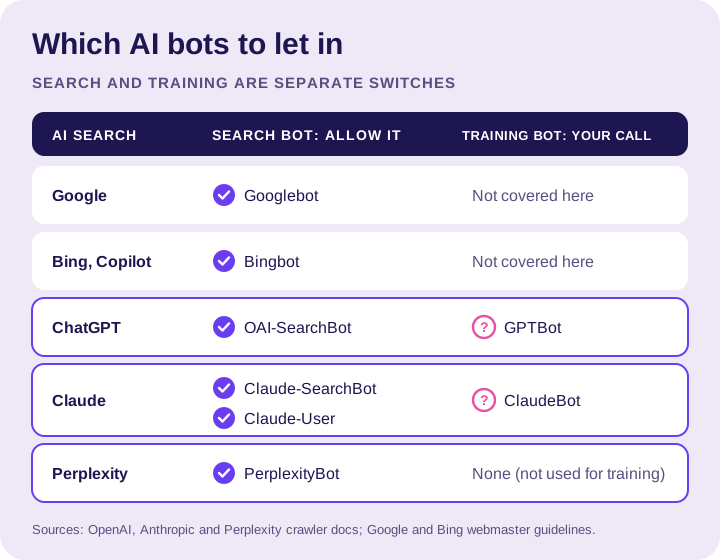
OpenAI says OAI-SearchBot is what surfaces websites in ChatGPT’s search features. Sites that block it “will not be shown in ChatGPT search answers,” though they can still show up as navigational links.
GPTBot is a different bot. It’s for training OpenAI’s models. You can block GPTBot and still allow OAI-SearchBot. They’re independent settings.
If your agency blocked every AI bot on your site “for security” and then sold you an AI visibility package, that’s like padlocking the front door and billing you for more foot traffic.
What to do
- Open
yourdomain.com/robots.txtin a browser. - Look for OAI-SearchBot. If it’s listed with
Disallow: /, ChatGPT search can’t use your pages. - Look for a blanket block too:
User-agent: *followed byDisallow: /. That one blocks everybody. - Decide on GPTBot separately. Blocking it is a training choice, not a search choice.
- If you use a firewall or bot protection, ask whoever manages it to allow OpenAI’s published IP ranges. OpenAI recommends it.
- Give it a day. OpenAI says it can take about 24 hours for a robots.txt change to be picked up for search.
Ours just says User-agent: * and Allow: /. Took me 10 seconds to check. Go check yours. I’ll wait.
Bonus: claim your business in ChatGPT
On November 10, 2026, OpenAI announced Businesses in ChatGPT. Through Business Hub, eligible businesses can claim their business in ChatGPT, keep their info current and see insights like mentions and website clicks. Before you get excited:
- OpenAI’s help center says local stores and restaurants can currently claim only an existing U.S. listing. Some service businesses can’t add a brand-new one yet.
- Business Agents, the chat feature, are only for eligible U.S. ecommerce and online service businesses right now.
- You have to own the business or be authorized to represent it, and prove it before your claim is approved.
To try it: read OpenAI’s setup help article, open Business Hub from the ChatGPT sidebar and search for your business name. Claim it with an account the business controls, not your nephew’s. Have your business phone, business email or website domain access ready, plus your ID. OpenAI runs an identity check through Persona before you can publish changes. Then make every detail match your Google Business Profile exactly.
And yes, someone will try to sell you “ChatGPT listing management” by Friday. It’s a form. You can fill out a form.
2. Microsoft: How to write pages AI can actually quote
Link: Optimizing Your Content for Inclusion in AI Search Answers
What it is
An October 2025 post from Microsoft Advertising on how Copilot and Bing’s AI break pages into pieces and pick the ones to quote. If you only read one guide on writing, read this one.
Why it matters
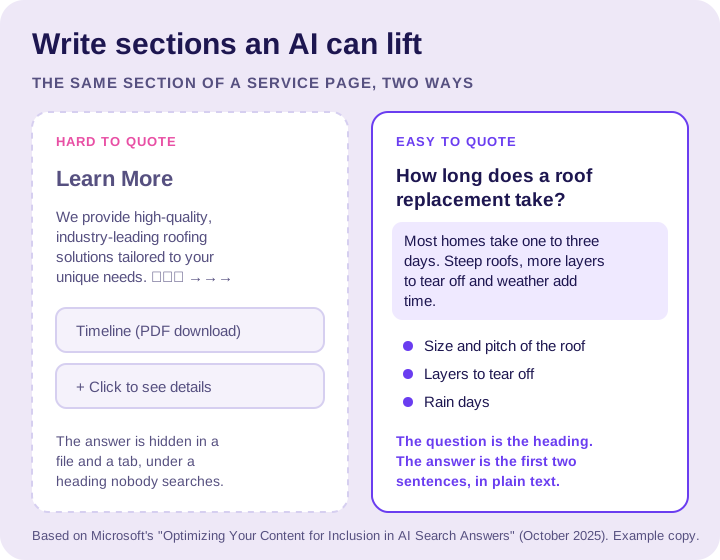
Microsoft says AI assistants don’t read a page top to bottom. They “parse” it into smaller pieces, then pick the clearest ones to build an answer. So every section on your page has to make sense on its own.
Microsoft also says not to hide important answers in tabs or expandable menus, not to put key info only in PDFs or images, and to skip decorative symbols like arrows and star strings.
Which describes a scary number of the agency-built service pages I’ve audited. “Learn More” headings. A paragraph about “industry-leading, customer-focused solutions.” The actual price range hiding in a PDF called Brochure_FINAL_v3. An AI can’t quote that. Honestly, neither can a human.
And my favorite line in the whole guide: “Be cautious with em dashes.” I’ve been saying that for free for years. Nobody listens.
What to do
- Make your page title, H1 and meta description agree with each other.
- Swap vague headings like “Learn More” for real questions, like “How long does a roof replacement take?”
- Answer the question in one or two sentences right under the heading. Then explain.
- Use short lists for steps and comparisons. Don’t turn every line into a bullet.
- Pull key info out of PDFs, images and click-to-open tabs and put it in plain text on the page.
- Replace fluff with specifics. “We install 16 SEER2 heat pumps” says more than “high-efficiency solutions.”
3. Google: The SEO Starter Guide nobody read
Link: SEO Starter Guide: The Basics
What it is
Google’s beginner guide to SEO. It’s the foundation AI Overviews still sit on, and it’s free.
Why it matters
Google says it right in the guide: “There are no secrets here that’ll automatically rank your site first in Google (sorry!).” A search engine with a sense of humor. Love to see it.
It also busts a few myths you may have paid for. Google says it doesn’t use the meta keywords tag. It says there’s no magic word count. And it says E-E-A-T is not a ranking factor. Their exact words: “No, it’s not.”
If an agency ever billed you for “keyword meta tag optimization,” I’m sorry. You paid for a tag Google says it doesn’t use.
What to do
- Use descriptive URLs.
/services/roof-repairbeats/page?id=4471. - Write a unique, clear title for each page. Include your business name and location when it fits.
- Write a short, unique meta description for each important page.
- Link your service pages to each other with plain anchor text like “storm damage roof repair,” not “click here.”
- Add alt text to your photos that describes what’s actually in the photo.
- Put your website on your trucks, yard signs and invoices. Google lists offline promotion as a real way to get found.
- Give changes a few weeks before you judge them. Google says some take hours, some take months.
4. Perplexity: The Cloudflare switch you didn’t know was on
Link: Perplexity Crawlers
What it is
Perplexity’s docs for its two bots, plus firewall setup steps.
Why it matters
Perplexity says PerplexityBot is what surfaces and links websites in its search results, and that it’s “not used to crawl content for AI foundation models.” Perplexity-User visits pages when a person asks a question, and Perplexity says it generally ignores robots.txt because a user asked for it.
The real gold here is a warning for anyone on Cloudflare. Perplexity says Cloudflare’s Bot Fight Mode can’t be skipped with a custom rule, so it can still challenge Perplexity’s bots. Tons of small business sites run on Cloudflare. Plenty of them have that switch on because somebody flipped it three years ago and never wrote it down.
What to do
- Check robots.txt for PerplexityBot. Don’t block it if you want to be in Perplexity’s answers.
- If you’re on Cloudflare, ask your web person whether Bot Fight Mode is on, and whether that’s on purpose.
- If you have a firewall, follow Perplexity’s steps to allow its published IP ranges.
- Give it up to 24 hours after a change. That’s Perplexity’s number, not mine.
5. Google: How AI Overviews pick their links
Link: AI features and your website
What it is
Google’s own documentation on how AI Overviews and AI Mode choose the pages they link to.
Why it matters
This is the page that ends most “AI SEO” sales pitches. Google says a page has to be indexed and eligible to show in Search with a snippet to appear as a supporting link. That’s it. It also says you don’t need new machine-readable files, “AI text files” or special schema to show up.
So the next time someone pitches you an “llms.txt optimization package,” you can send them this page and go back to your day.
It also explains “query fan-out.” AI Overviews and AI Mode may run several related searches across subtopics to build one answer. A question like “should I repair or replace my roof” can pull from pages about cost, storm damage, insurance and materials. More genuinely useful pages, more chances to be one of the links.
What to do
- Search Google for
site:yourdomain.com. If your pages show up, you’re indexed. - Verify your site in Google Search Console if you haven’t. Google points to it for finding technical problems.
- Make sure nothing is blocking Googlebot. Google lists robots.txt, your CDN and your hosting as places crawling can get blocked.
- Keep your Google Business Profile current. Google calls it out by name.
- Track it in Search Console. Google says AI feature traffic is counted in the Performance report under the “Web” search type. There’s no separate AI line, no matter what your agency’s dashboard says.
We went deeper on this one in AI Overviews and Local SEO: What Actually Changes.
6. LinkedIn: AI visibility for B2B
Link: Unlocking AI Visibility: The B2B Marketer’s Guide to LinkedIn
What it is
A downloadable guide from LinkedIn on getting cited by AI tools for business questions.
Why it matters
Fair warning: this one is written for B2B marketers, not for a plumber selling to homeowners. LinkedIn says it’s the most-cited domain for professional questions in AI search. That’s LinkedIn’s claim about LinkedIn, so take it the way you’d take my claim about my own agency. With a grain of salt and a smile.
Where it does fit: commercial and B2B work. If you bid on property management contracts, sub for general contractors, sell to builders or sell professional services, those buyers live on LinkedIn. The guide covers answer blocks, clear headers and topic clusters, which line up with Microsoft’s advice in #2.
What to do
- Download the guide from LinkedIn’s page.
- Fill out your Company Page completely: what you do, where you work, your website.
- Make sure your business name and services match your website and Google Business Profile word for word.
- If you do commercial work, post one real project write-up a month. Lead with the answer, then the details.
- If you’re 100% residential and short on time, skip this one for now. The rest of the list matters more.
7. Anthropic: The three Claude bots
Link: Does Anthropic crawl data from the web, and how can site owners block the crawler?
What it is
Anthropic’s help article on its three bots: ClaudeBot, Claude-User and Claude-SearchBot.
Why it matters
Same idea as OpenAI in #1, different names.
- ClaudeBot collects content that could be used for training. Blocking it tells Anthropic to leave your future content out of training.
- Claude-SearchBot indexes content to improve Claude’s search results. Anthropic says blocking it “may reduce your site’s visibility and accuracy in user search results.”
- Claude-User fetches pages when a person asks Claude a question. Anthropic says blocking it can reduce your visibility for user-directed web search.
Anthropic says its bots follow robots.txt, and that blocking by IP address may not work reliably.
What to do
- In your robots.txt, search for ClaudeBot, Claude-SearchBot and Claude-User.
- If you want to show up in Claude’s answers, don’t block Claude-SearchBot or Claude-User.
- If you only care about training, block ClaudeBot by name. That’s the one Anthropic treats as its training crawler.
- Remember robots.txt rules are per subdomain. If you run
book.yourdomain.com, it needs its own file.
8. Bing: The webmaster rules that also run Copilot
Link: Bing Webmaster Guidelines
What it is
Bing’s official rules for how it finds, crawls, indexes and ranks pages across Bing search, Copilot and its grounding API.
Why it matters
Bing says it plainly: SEO fundamentals still apply to grounding and AI experiences. It says to put essential information near the top of the page, keep each URL focused on a single topic, and name your business, services and locations clearly and consistently.
Bing also has a few rules that surprise people. It says NOARCHIVE keeps content out of Copilot responses, and NOCACHE limits Copilot to your URL, title and snippet. If your developer added those tags “for security,” they might be costing you citations. Another padlock, another bill.
What to do
- Set up Bing Webmaster Tools and submit your XML sitemap.
- Turn on IndexNow if your website platform supports it. Bing lists it first among the ways to get new and updated pages found.
- One service, one page. Don’t cram roofing, siding and gutters onto a single URL.
- Use 301 redirects when a page moves. Bing says to use 302s only for very short-term changes.
- Use the same business name, address and phone everywhere. Our citations guide walks through it.
- Watch impressions, not just clicks. Bing says a drop in clicks doesn’t always mean you lost visibility.
9. Google: What actually works in AI search
Link: Top ways to ensure your content performs well in Google’s AI experiences on Search
What it is
A May 2025 post from John Mueller on the Google Search Central blog with Google’s top tips for AI Overviews and AI Mode.
Why it matters
Google says people are asking AI search “longer and more specific questions,” plus follow-ups. Nobody types “HVAC near me” into AI Mode. They type “my heat pump is blowing cold air in heating mode, is that a repair or a replacement.”
Google’s answer is unique, non-commodity content. Translation: the stuff only you know. Your real jobs, your local conditions, your actual process. Not the same 500-word “Top 5 Benefits of Gutter Cleaning” blog your agency posted on every client site at once.
Google also says clicks from AI Overviews tend to be higher quality, with people spending more time on the site. So don’t panic if raw clicks dip. Watch calls and booked jobs.
What to do
- Write down the 10 questions customers ask you on the phone. Turn the best ones into sections on your service pages.
- Add real photos of real jobs to the page they belong on. Google says to support your text with high-quality images and video.
- Check your page on a phone. If the main info is buried under pop-ups, fix that first.
- If you use structured data, make sure it matches what’s visible on the page.
- Measure leads, not just clicks.
10. Profile Launch: A free consultation
Link: Book a free consultation
What it is
A free call with us. You tell us about your business and the area you serve. We look at your site, your robots.txt, your Google Business Profile and how you show up in AI answers, and tell you what we’d fix first.
Why it’s on the list
Because nine free guides is a lot of homework, and some of you have actual jobs to run.
Here’s the deal. No 12-month contract talk on the first call. No “proprietary AI algorithm.” No 40-slide deck. If the fix is a one-line robots.txt change, we’ll tell you that, and you can make it yourself for free. That’s kind of the whole point of this post.
If it turns out you want help with the bigger stuff, we’ll tell you what it would cost, straight up.
What to do
- Run the 10-second robots.txt check from #1 first. It might save you the call.
- Tell us about your business. We’ll reach out within 24 hours.
- Want to see numbers first? Here’s our pricing. Right there on the website. Wild concept, I know.
The one-hour checklist
Zero dollars. One hour. Pour a coffee.
- Search
site:yourdomain.comon Google. Are your main pages there? - Open
yourdomain.com/robots.txt. Make sure you’re not blocking Googlebot, Bingbot, OAI-SearchBot, Claude-SearchBot or PerplexityBot. - Ask your web person whether Cloudflare Bot Fight Mode or a firewall is challenging bots.
- Verify your site in Google Search Console and Bing Webmaster Tools. Submit your sitemap to both.
- Pick your top service page. Rewrite the headings as real customer questions and answer each one in the first two sentences.
- Move any key info out of PDFs, images or click-to-open tabs into plain text.
- Check that your name, address, phone and service area match on your website, Google Business Profile, Bing and LinkedIn.
- Look for your business in ChatGPT’s Business Hub. Claim it if it’s there and you’re eligible.
- Write down your leads this month so you have a baseline next month.
FAQs
Do I need to pay for “AI SEO” to show up in ChatGPT or Google AI Overviews?
No, not to get started. Google says there are no additional requirements to appear in AI Overviews or AI Mode beyond normal Search requirements. Most of the work is free: let the right bots crawl your site, keep your info accurate and write clear answers to real customer questions.
How do I know if my website is blocking ChatGPT?
Open yourdomain.com/robots.txt and look for OAI-SearchBot. OpenAI says sites that block OAI-SearchBot won’t be shown in ChatGPT search answers. Also check for a blanket User-agent: * with Disallow: /, and ask whoever runs your firewall whether bot protection is challenging OpenAI’s crawlers.
If I block GPTBot, will I disappear from ChatGPT?
Not from ChatGPT search. OpenAI says GPTBot and OAI-SearchBot are independent. GPTBot is for training its models. OAI-SearchBot is for search. You can block one and allow the other.
Do I need special schema markup or an AI text file?
No. Google says you don’t need new machine-readable files, AI text files or special schema.org markup for its AI features. If you use structured data, Google says everything in it should also be visible on the page, and Bing treats it as support for your text, not a replacement. Our schema guide covers what’s worth adding for a local business.
How do I track whether AI search is sending me customers?
Start with Google Search Console. Google says AI Overviews and AI Mode traffic is counted in the Performance report under the “Web” search type. Bing says to watch impressions too, since content can show up in Copilot without a click. Then track what pays: calls, form fills and booked jobs. Our local SEO reporting guide shows what to look at.
Can I claim my business profile in ChatGPT?
Possibly. OpenAI says eligibility depends on location, business type and verification. Its help center says local stores and restaurants can currently claim only an existing U.S. listing. Search for your business in Business Hub. If a listing exists and you own or represent the business, you can start a claim.
How should I write a service page so AI tools quote it?
Lead with the answer. Microsoft says AI assistants break pages into pieces and pick the clearest ones, so use question headings, answer in one or two sentences, use short lists for steps and keep key info in plain text. Bing adds: put essential info near the top and keep each page to one topic.
Where do I start if I only have 10 minutes?
Check your robots.txt. If the bots can’t read your site, nothing else on this list helps. After that, verify your site in Search Console and Bing Webmaster Tools.
The bottom line
The companies that built AI search told us how it works. For free. The businesses showing up in AI answers are mostly the ones that let the bots in, keep their info accurate and answer real questions in plain words.
None of that needs a 12-month contract, a setup fee or a quarterly report you pretend to read. It needs an hour and a little stubbornness.
If you run the checklist and something looks weird, or you’d rather have a second set of eyes on it, book the free call. Worst case, we tell you it’s fine and you saved $1,997 a month.