
Google Business Profile · DIY guide
Google Business Profile Insights: Reading Your Numbers
What your Google Business Profile performance report counts, from calls and directions to views and search terms, plus a simple check to run every month.
 Noah Ziegler6 min read
TLDR
- Google now calls insights “Performance.” Open it from your profile on Google Search or in the Google Maps app.
- Calls, messages, directions and website clicks are people reaching out. Views and searches are people seeing you.
- Check it once a month, compare with the same month last year, and match calls to booked jobs.
Your Google Business Profile keeps score for you. Most owners never open the report, or they glance at the biggest number on the page and stop there.
Here’s what each number actually counts, which ones matter for a service business, and a short check to run every month.
Where to find it
Google used to call this report “insights.” Today it’s called Performance, and Google explains it in its guide to Business Profile performance.
- On Google Search: open your Business Profile, click Performance, choose a time period and click Apply.
- In the Google Maps app: tap Business at the bottom right, tap See more next to Performance, choose a time period and tap Apply.
Only the numbers that apply to your kind of business appear. A plumber won’t see menu clicks, and that’s fine.
What each number counts
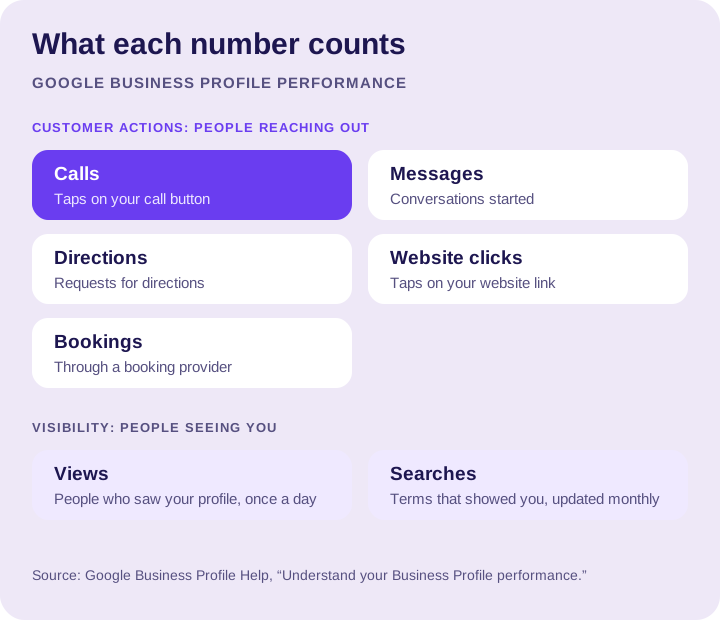
In Google’s words, roughly:
- Calls: the number of times someone tapped the call button on your profile. You need a phone number on the profile for this to work. It counts taps, not answered calls.
- Messages: the number of conversations started through messages.
- Directions: how many people asked for directions to your business. Google says it filters out repeat taps, cancelled requests and spam.
- Website clicks: taps on the website link on your profile.
- Bookings: bookings people completed, if you take bookings through a connected booking provider.
- Views: how many people viewed your profile on Search and Maps. Each person counts once a day, so this can be lower than the numbers in Google’s emails.
- Searches: the search terms people used when your profile showed up. Google updates this at the start of each month, and it can take up to five days to appear.
The numbers that matter most
Calls, messages, directions, website clicks and bookings are customer actions. Somebody wanted to hire you, or at least wanted to learn more. Those are the numbers to watch.
Views and searches are visibility. They tell you people are seeing you, which is useful, but nobody pays an invoice with a view. A month with fewer views and more calls is a good month.
For most service businesses, calls come first. If customers usually come to you, directions matter too.
Read your search terms
The Searches list is the most underused part of the report. It shows the words people typed when your profile appeared. Look for three things:
- Your best services. If your most profitable job never shows up in the list, your profile and website may not say it clearly enough. Add it as a service and give it a page on your site. Our guide to categories, services and attributes shows where it goes.
- Your business name. People searching your name already know you. That’s great, but it isn’t new demand.
- Work you don’t do. If you keep showing up for jobs you turn down, your categories or description may be pulling the wrong searches.
A monthly check
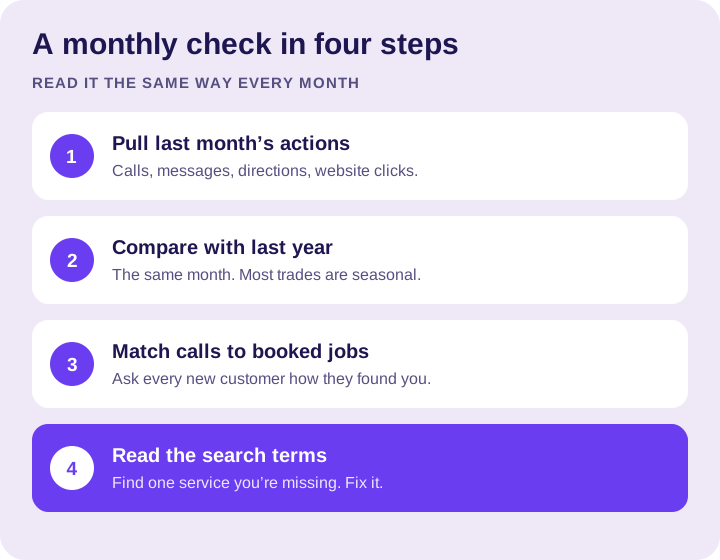
- Pull last month’s customer actions. Calls, messages, directions and website clicks.
- Compare with the same month last year, not just last month. Most trades are seasonal, and July against December tells you nothing.
- Match calls to booked jobs. Ask every new customer how they found you and write it down.
- Read the search terms and fix one gap. One service, one page, one category check.
Common mistakes
- Judging the profile by views alone. Views can drop while calls climb.
- Treating every call tap as a job. Some taps never turn into a conversation. That’s why step 3 matters.
- Only looking at totals across several locations. A strong location can hide a weak one. Our multi-location guide covers how to look at each one.
- Checking once a year. By then, a problem has cost you a season.
FAQs
Where do I find insights on my Google Business Profile?
In the Performance report, which is what Google now calls insights. On Google Search, open your Business Profile and click Performance. In the Google Maps app, tap Business, then See more next to Performance.
Does the calls number count answered calls?
No. Calls counts the times someone tapped the call button on your profile, not calls you answered. Some taps never turn into a conversation, so match calls to booked jobs.
Why are my profile views lower than the numbers in Google’s emails?
Because the Performance report counts each person once a day. That can make views lower than the numbers in Google’s emails.
When do search terms update in the Performance report?
At the start of each month. Google says it can take up to five days for the new search terms to appear.
Which Google Business Profile numbers matter most?
Customer actions: calls, messages, directions, website clicks and bookings. Views and searches tell you people are seeing you, but nobody pays an invoice with a view. For most service businesses, calls come first.
How often should I check my Google Business Profile performance?
Once a month. Compare with the same month last year, since most trades are seasonal, and match calls to booked jobs.
The bottom line
Your profile already tracks the people who reach out. Watch the customer actions, compare like with like, and use the search terms to find the services you should be showing up for.
Every Profile Launch plan includes monthly reporting, and our guide to what a real local SEO report should show explains what to expect from any agency. If you want help with the profile itself, see our Google Business Profile management or talk to us about your numbers.