
Local SEO · DIY guide
Multi-Location Local SEO: Managing Many Google Profiles
Multi-location local SEO: one Google Business Profile and one web page per real location, what must be unique, verifying in bulk and keeping it all organized.
 Noah Ziegler5 min read
TLDR
- Each real, staffed location gets its own Google Business Profile and its own page on your website.
- Name stays the same; address, phone, hours, photos and reviews belong to each location.
- Organize access so the owner controls everything and each manager sees only what they need.
Opening a second location is a big step. Showing up on Google for it shouldn’t be an afterthought. Each location needs to stand on its own in local search, while the brand stays consistent.
Here’s how to set up and run local SEO across several locations without making a mess.
One location, one profile
The basic rule: every real location that serves customers gets its own Google Business Profile.
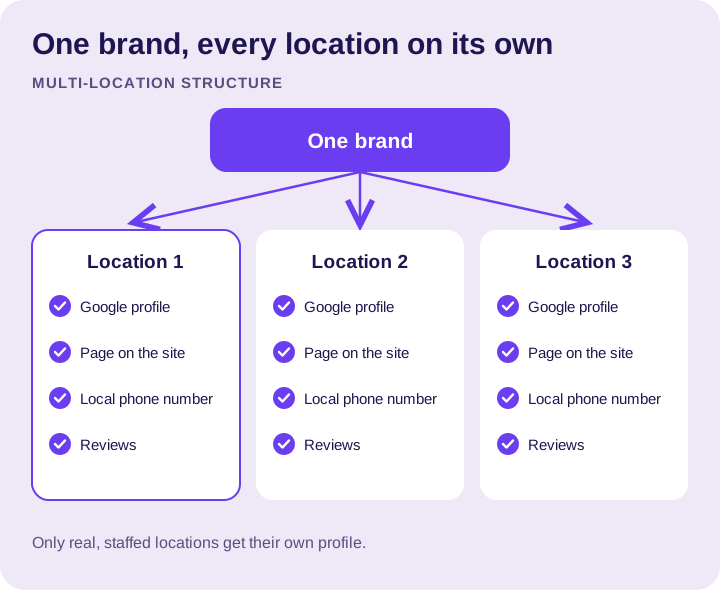
A location counts if customers visit it, or if a team works from it during your business hours. A mailbox or a virtual office doesn’t count. Google says a virtual office isn’t eligible for a profile, and using one can get you suspended. See Google’s guidelines.
What’s shared and what’s unique
Some details should match across every location. Others must be specific to each one.
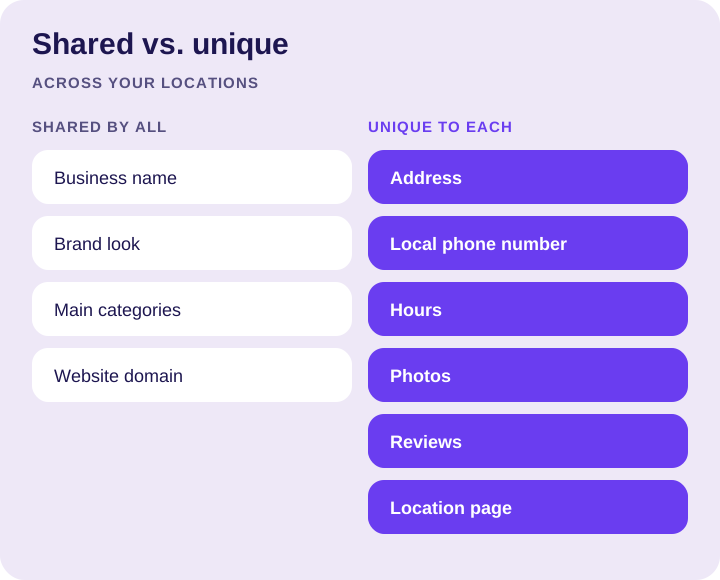
Shared: the business name (without adding the town to it), the brand look and the website.
Unique to each location:
- The real address, or service area if that location serves customers on-site.
- A local phone number that rings at that location.
- Hours for that location.
- Photos of that location, its team and its work.
- Its own reviews, from its own customers.
A page for every location
Each profile should link to its own page on your website, not just your homepage. A good location page has:
- The location’s address, phone number and hours, matching its profile.
- The services that location offers.
- Something real about that location: the team, the area it serves, the work it does.
- A clear way to call or book.
Pages that are the same text with a different city name don’t help customers or Google.
Verifying and managing access
If you have a lot of locations, Google offers bulk verification so you don’t have to verify every profile one by one.
For access, keep it simple:
- The owner stays the owner of every profile.
- Location managers get manager access only to their own location.
- Your agency gets manager access, never ownership. See our manager access guide.
Keep a list of every location, its profile and who has access. When someone leaves, you’ll know what to remove.
Keeping it consistent at scale
- Update hours everywhere before holidays, location by location.
- Ask for reviews at every location, and reply to all of them.
- Post and add photos per location, not one post copied to all.
- Check listings for each location’s address and phone, not just the main one. Our citations guide covers how.
How to measure each location
Look at each location on its own: calls, direction requests, website clicks and reviews. A strong location can hide a weak one if you only look at totals. Our guide to Google Business Profile insights shows where each number lives.
FAQs
Does each business location need its own Google Business Profile?
Yes. Every real location that serves customers gets its own Google Business Profile. A location counts if customers visit it, or if a team works from it during your business hours.
Can I use a virtual office to get a profile in a new town?
No. Google says a virtual office isn’t eligible for a profile, and using one can get you suspended. A mailbox doesn’t count either.
Should I add the town name to my business name for each location?
No. The business name stays the same across every location, without the town added. The address, phone number, hours, photos and reviews are what make each location its own.
Can all my locations link to my homepage?
They shouldn’t. Each profile should link to its own location page with that location’s address, phone, hours and services. Pages with the same text and a different city name don’t help customers or Google.
Do I have to verify every location one at a time?
Not if you have a lot of locations. Google offers bulk verification for businesses with many locations, so you don’t have to verify every profile one by one.
Who should own the Google profiles for a multi-location business?
The business owner should own every profile. Location managers get manager access only to their own location, and your agency gets manager access, never ownership.
The bottom line
One real location, one profile, one page. Keep the brand consistent and the local details local. That’s the whole system.
Running several locations? Let’s talk about your profiles, or see our Google Business Profile management.